
Casefleet vs Claude: a litigation workspace vs a blank chat window

Claude is one of the best general-purpose AI models in the world, and Casefleet runs on it. The difference is not the model. It's everything built around it: a persistent case workspace where facts, documents, depositions, and timelines live together.
Request a demo →

The bottom line

Claude (at claude.ai) is a remarkably capable AI assistant. Paste in a document, ask it to summarize, draft an email, or talk through a legal question, and it does a genuinely good job. For quick, one-off tasks it's excellent, and a lot of lawyers already use it that way.

Casefleet is a litigation platform that uses Claude models to do the AI work, but wraps them in what a chat window doesn't have: a structured case. Your facts, issues, witnesses, exhibits, documents, and deposition transcripts are stored, linked, and searchable. When Casefleet's AI extracts a fact, it links that fact to the exact page it came from. When it drafts a motion, it draws on the actual evidence in your case. Nothing is copy-pasted in and out of a chat box, and nothing disappears when you close the tab.

The honest way to think about it: Claude is the engine. Casefleet is the car built around that engine for one specific job: litigation. If your work is a single quick task, the engine alone is fine. If your work is a case with thousands of pages that lives for months or years, you want the car.

Feature comparison

Casefleet
Claude (claude.ai)
Best general-purpose AI model ✓ — Runs on Claude models✓ — Is Claude
Persistent case workspace (facts, issues, witnesses, evidence linked together) ✓ — litigation workspace✗ — No case structure
Facts linked to the exact source page they came from ✓ — AI-Proposed Facts with citations✗ — No document-of-record linking
Remembers your whole case across sessions ✓ — Everything is stored✗ — Each chat starts fresh
Full-text search across every page of every case document ✓ — full-text search✗ — No document repository
Visual, interactive case timelines ✓ — timeline maker✗
Synced deposition video and transcript ✓ — video/transcript sync✗
Litigation-ready reports pulled from your case data ✓ — reporting✗
Purpose-built for litigation workflows ✓✗ — General purpose
Read-only access to your data (AI cannot alter your record without approval) ✓ — You approve every changeN/A — No case record to protect
Enterprise data handling with zero-retention AI processing ✓ — Commercial API, no training on your data~ Depends on plan and settings
Quick one-off questions and general drafting ✓ — Via Casey✓ — Its core strength
Team collaboration on shared cases (shared access, task assignment, activity tracking) ✓✗ — Individual assistant

Where Claude on its own is genuinely great

We're not going to pretend Claude isn't useful. It is, and Casefleet is built on it. Paste in a document and ask for a summary, get a first draft of a letter, talk through a legal question in plain English. For quick, in-the-moment work, Claude is excellent and you may not need anything more.

Where it starts to break down is when the work stops being a single task and becomes a case. Every session starts from nothing, and you end up managing the case in your head and in scattered files while pasting pieces into the chat one at a time.

That gap is the entire reason Casefleet exists. A chat window can't:

  1. Remember your matter from one session to the next
  2. Store six thousand documents
  3. Link a fact back to the exact page it came from
  4. Search across your whole file
  5. Build a timeline you can actually use in court
  6. Let three people on your team work from the same set of facts
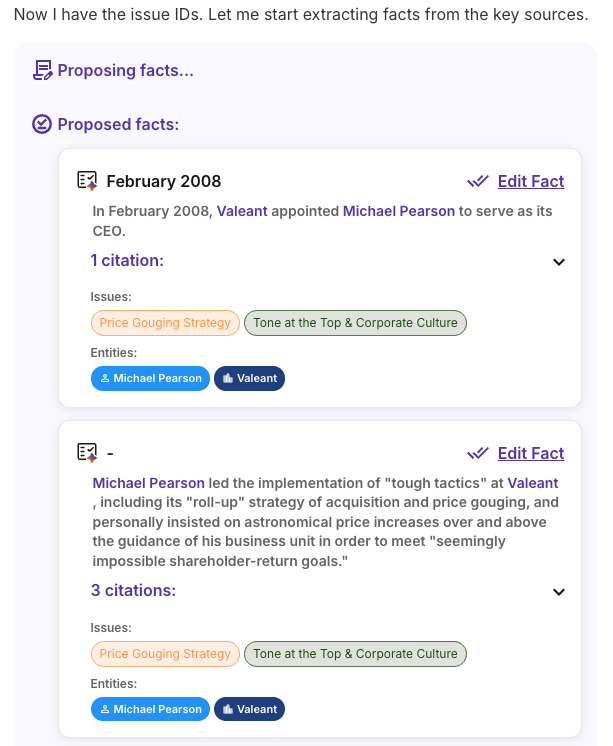
Casey proposing facts with linked citations

What Casefleet adds on top of the model

We take the same class of AI you'd use in a chat window and point it at an organized case. Every fact the AI proposes links back to the exact document and page, so you can check it in seconds. Your documents live in one searchable place. Facts, witnesses, issues, and evidence stay connected for the life of the case.

And the AI has read-only access to your data, so it proposes and you approve. Nothing lands in your record that you didn't check.

Almost every AI-hallucination sanction we've seen traces back to the same mistake: the output looked right, nobody checked it against the record, and it got filed. Casefleet makes checking the default, because every answer points back to a source you can click.

Pricing and getting started

Claude's Pro plan is a fair price for what it is: a general-purpose assistant. Casefleet's plans include the case workspace. All pricing is published on the pricing page.

  • Claude Pro: ~$20–30/user/month. Access to the model in a chat interface.
  • Casefleet Starter: $30/user/month (annual). Fact chronologies, document review, case outlines, and team collaboration.
  • Casefleet Advanced AI: $140/user/month (annual). Adds document intelligence, AI-proposed facts with linked citations, entity recognition, full-text search, agentic drafting, and unlimited documents.

Enterprise plans with SSO, priority support, and data migration are available for larger teams. You can start a 14-day free trial right now with just your email — no credit card, no sales call.

Proof from litigation teams

quote icon

I really appreciate the attention to constant improvement. Going with Casefleet still remains one of the best business decisions I've made. The ability to export the factual timeline and organize/filter facts by issues was invaluable for witness examinations.

Jason Shinn, Attorney

Frequently asked questions

Doesn't Casefleet just use Claude anyway? Why not use Claude directly?

Casefleet does use Claude models to power its AI, and that's the point. You get the same quality of AI reasoning, but pointed at a structured, persistent case instead of a blank chat window. Using Claude directly is great for one-off tasks. Casefleet is what you use when the work is an entire matter with thousands of pages that has to stay organized, searchable, and verifiable across months of litigation.

Can Claude build a fact chronology from my documents?

Claude can summarize documents you paste in and help you draft a timeline in that conversation. What it can't do is store your documents, link each fact back to the exact source page, keep the chronology connected to the rest of your case, or let you turn it into a court-ready report. Casefleet does all of that, and keeps it in one place for the life of the case.

Is my client data safe with Casefleet?

Casefleet processes AI through the commercial API with enterprise data handling, which means your client data is not used to train AI models. Casefleet also gives the AI read-only access to your case data, so the AI can propose changes but you approve everything before it becomes part of your record. Security details are on the software security page.

What about hallucinations and made-up citations?

This is the problem Casefleet is designed around. Because every AI-proposed fact is linked to the exact source document and page it came from, you can verify each one in seconds rather than trusting the output blind. The AI shows its work. That traceability is the difference between an AI answer you have to redo to trust and one you can actually rely on.

Can Casefleet do quick tasks too, or just big cases?

Both. Casefleet's AI assistant, Casey, handles quick questions and drafting the same way a chat window would, but it does it with full knowledge of your case. So you get the fast one-off answers and the organized long-term workspace in the same tool.

Do I still need a separate legal research tool?

Possibly. Casefleet is a litigation workspace, not a legal research database. Many firms run Casefleet as their case workspace alongside a dedicated research tool.

See Casefleet on your kind of case

Compare to Harvey, CoCounsel, CaseMap+ AI, and Everlaw. Or start your 14-day free trial today with just your work email. No credit card, no sales call.

See Casefleet on your kind of case

Request a demo →